 guest-tv
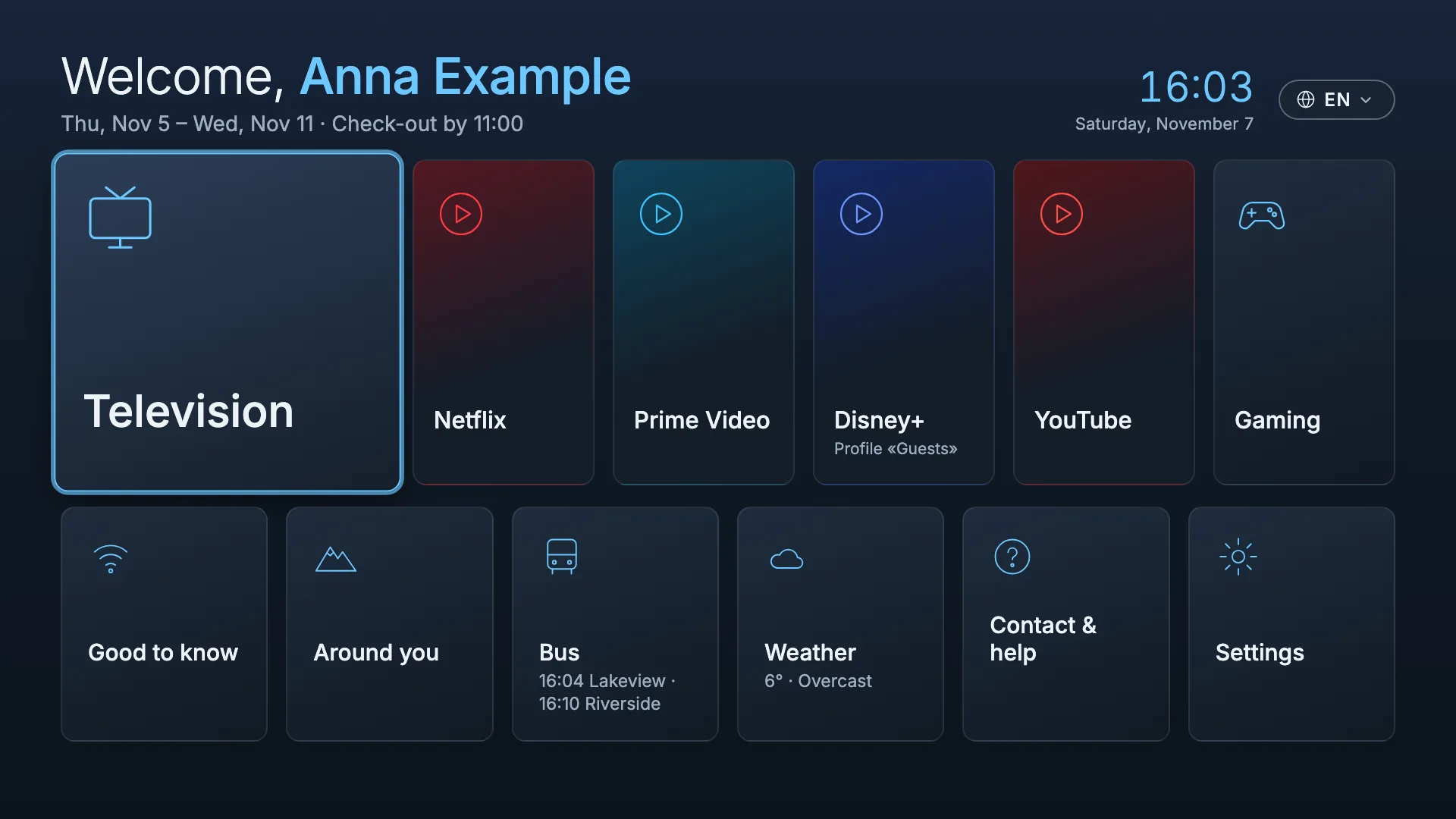
 is the hotel-style start screen I designed for the three LG TVs in my holiday apartment in the Swiss Alps. It greets each guest by name, and a Raspberry Pi resets the TVs after every stay. I didn't want to buy extra boxes for it, so the app runs on the TVs themselves. It's free and open source.
How do I get a hotel-style start screen on LG TVs in a rental?
I run a holiday apartment in the Swiss Alps with three LG TVs. I wanted my own start screen on them, like in a hotel, without buying extra hardware. The alternative was three Google TV boxes plus kiosk-app licenses. I chose to use the hardware the TVs already have.
That only works on a rooted TV. All three of mine ran firmware that LG no longer updates, and a public exploit could root it. After an LG update, rooting might no longer be possible, so for each TV it was now or never. A rooted TV then stays on that firmware.
My design rule is to show only information that is always true. There are no taglines, no help texts, nothing seasonal and no opening hours that may change. Live values older than 3 hours are hidden.
I decided the approach and what goes on the screen, tested every version on the TVs in the apartment and checked the work. Claude Code wrote the code from my plan. Models from other labs reviewed it: OpenAI's Codex, Z.ai's GLM, Meta's Muse and xAI's Grok, in six review rounds over three days. Every finding was checked against the code before anything was fixed. The public version had its own review round on 7 November 2026 with the same four models, and the real findings were fixed, each with a test that failed first.
I worked on it over the weekend of 31 October and 1 November 2026. The first TV went live on 2 November and all three TVs on 3 November.
What does a guest see on the TV, and what does the Pi do?
Six languages
German, English, French, Italian, Dutch and Polish. The language comes from the booking, and the guest can switch it. The TV's own system language follows, so apps open in the same language. After a change the Pi closes the media apps, because they keep their language until they restart.
Two rows of tiles
The first row has the live TV app, Netflix, Prime Video, Disney+, YouTube and one Gaming tile for consoles on HDMI. One console switches directly, several show a choice. The Disney+ tile names the profile guests should use. The second row has Good to know (Wi-Fi name, password and QR code, check-out list, house rules), Around you (local tips), Bus (next departures), Weather (7 days, valley and mountain points, webcams), Contact and help (WhatsApp QR code, emergency numbers, frequent questions) and Settings.
Check-out, vacancy and screensaver
On the departure day a check-out banner opens the check-out list until 11:00. From 11:00 the TV shows the vacancy screen, and on an arrival day the next guest's greeting appears from 11:00. After 3 minutes without input the screensaver shows clock, date and weather. The clock moves every minute so nothing burns into an OLED panel.
Settings guests can change
Guests can set a sleep timer (off, 30, 60, 90 or 120 minutes), screen brightness (automatic, bright, medium, dimmed or dark) and eye comfort mode. LG does not let third-party apps change TV settings, so the app sends the choice to the Pi, and the Pi writes it on the TV as root over SSH. When a new guest arrives, brightness, eye comfort and sleep timer go back to the TV's normal values if the home screen had changed them.
Home screen on every power-on
An LG TV returns to the last input when it is switched on, for example a game console, even with LG's own option to launch Home on start. A small script on the TV watches the power state and brings the home screen to the front whenever the TV wakes from standby. LG's hotel mode locks the voice key, and the Home key opens the home screen. The settings (gear) key stays open, because the hotel-mode switches that lock it also lock Home. It works with the arrow keys of the LG remote and with the Magic Remote pointer.
Live data from the Pi
Every hour the Pi builds one state file with the current guest from the booking system Smoobu (or from a JSON file), weather from Open-Meteo, bus departures from transport.opendata.ch (Switzerland only), webcam images, local content and the guest Wi-Fi with QR codes. The TVs fetch it every 5 minutes, and images come from the Pi. The app keeps the last state and ships with its content, so it still starts without the Pi and shows an Offline badge.
Reset after every stay
After a departure, between 11:00 and 16:00 and only while no guest is in the apartment, the Pi resets each TV. Before 15:00 it touches only a TV that is switched off, from 15:00 a running one too. It wakes the TV over the network, closes the media apps, brings the home screen to the front, sets the recorded normal picture, sound, sleep timer and system language, deletes the Netflix, YouTube and Prime Video login data from a fixed list of files and checks they are gone, reboots and switches the TV off. Disney+ and the live TV app stay logged in. If a step fails, the Pi switches the TV off and tries again the next hour. A full reset took about two to three minutes per TV in the final tests on 3 November 2026.
Is it safe to root a TV in a holiday rental?
guest-tv needs rooted LG TVs, and rooted TVs can be controlled over the network. Keep the TVs and the Pi in a network that guests cannot reach, and give guests a separate guest Wi-Fi. The repo contains no rooting tool. You root your own TVs with the methods of the webOS Homebrew project, and only if it lists your firmware.
Give guests a separate guest Wi-Fi and keep the TVs and the Pi in a network they cannot reach. That also protects the state file: it holds the guest's name, the stay dates and the guest Wi-Fi password, and any device in the same network could read it. Root access goes only over SSH with the Pi's key, and telnet is off.
Rooted TVs stay on firmware that LG no longer patches. Turn off automatic updates; the Homebrew Channel can block LG's update servers. That is a known, accepted risk.
The Pi takes requests only from the configured TV addresses and only with the app's origin, runs only fixed actions with fixed values and never passes request text to a shell.
The reset deletes only files on a fixed list and checks that they are gone. It does not undo a guest's logout or own login in Disney+ or the live TV app, or picture values a guest set on HDMI inputs.
Open-Meteo's free API is for non-commercial use, so a rental may need their paid plan. Webcam images and resort pages belong to their owners, so ask first. With rooted TVs, publish nothing that identifies your apartment.
How do I build guest-tv with my own coding agent?
The repo has the TV app (app/), the Pi part (pi/), a package build that makes the .ipk without LG's SDK (build/), tests (test/) and AGENTS.md, the build guide a coding agent follows. Clone it, point your coding agent at AGENTS.md and work through it together. The TVs, timezone, booking system, weather, bus stop, webcams and screensaver photos go in one config file on the Pi; the property name and welcome texts are in app/i18n/, the local content in pi/content/content.json, and the check-out and check-in times are constants in the code. All content in the repo is invented sample content. The commands below are the main steps on your development machine (macOS or Linux) and on the Pi.
git clone https://github.com/kevintheo-ai/guest-tv && cd guest-tv
node test/selfcheck.mjs
python3 test/test_state_builder.py
python3 test/test_tv_settings.py
python3 test/test_turnover.py
python3 test/test_scripts.py
The browser walkthrough runs 230 checks in headless Chromium at 1920x1080 with the remote control by keyboard, the Magic Remote pointer, all six languages with no text cut off and the settings flow. Offline tests cover the Pi logic, including the reset against a simulated TV. The agent first asks you for the TV models and webOS versions (are they rootable?), the TVs' IP and Wi-Fi MAC addresses, the Pi's address, your booking system (Smoobu or another), check-out and check-in times, languages, guest Wi-Fi, location for weather, bus stop (Switzerland only), local tips, emergency numbers, which accounts stay logged in and whether the reset after each stay should run.